This was my first taste of presenting at a big name developer conference, and what a great event it turned out to be. If you attended my talk on Yammer API Development I hope you found it worthwhile. Please @mention me on the Yammer Developer Network with any follow-up questions.
There were some awesome from Elijah Manor, Bill Wagner, and many others. Co-locating the conference alongside Angle Brackets and the other Intersection conferences allowed me to dip into relevant talks from a range of speakers I normally wouldn't be able to see.
If you are interested in more of this, the next one will be held in Orlando in April.
One of the biggest pain points with enterprise web applications is user engagement stemming from another logon to remember, and mountain of profile fields to complete. Fortunately there are ways to improve this experience.
Depending on the situation you might be able to take advantage of Integrated Windows Authentication with access to Active Directory profiles, or have another identity service deployed. In my experience these can have a range of limitations including poor data quality, and a heavyweight programming model.
It would be nice to be able to implement something along the lines of Facebook Login. ASP.NET MVC 4.0 provides great support for social authentication providers, but out of the box it doesn’t provide support for any enterprise social networks. These building blocks are, however, an excellent foundation for implementing support for a Yammer provider.
Yammer is an enterprise social network (ESN) and at the core of the functionality is a user profile for each user within your organization. These profiles are controlled by users, and often have content that is more up-to-date than internal directories. In many cases customers are also using Directory Sync to update profile fields.
I took some time to implement an OAuth 2.0 client which is compatible with Yammer, and I'm sharing the details below. This can be used in ASP.NET MVC sites, but it is something that you could modify to work with other types of .NET applications. There are however better choices for Windows Phone where an SDK is available.
Implementing the client
As ASP.NET MVC builds on functionality from DotNetOpenAuth the focus is on extending OAuth2Client as YammerClient. The complete implementation is available online, but the methods you need to implement are:
GetServiceLoginUrl() which is responsible for preparing the URL to redirect the user so that they can authorize your application.
QueryAccessToken() which executes a callback to Yammer in exchange for an OAuth access token.
GetUserData() which is responsible for querying profile data.
Something worth noting is that if you want to be able to make Yammer API calls, or silently check for profile updates, then you may need to modify GetUserData() to persist the token.
Using the client
Using the client in a new ASP.NET MVC Internet Application project is straightforward. Before going any further there are some steps you need to take to register an application on the Yammer site. These steps can be completed through the registered applications page, and detailed instructions are provided on the developer site.
It is very important that you set a Redirect URI for your Yammer application. The format will be along the lines of http://localhost:31074/ for your development site in Visual Studio (adjust the port!), but you'll need to change it to something like https://www.myapp.com/authorize for production.
Back in Visual Studio you simply need to instantiate an instance of the YammerClient class, and register it in AuthConfig.cs:
public static void RegisterAuth()
{
    const string appId = "Your Application ID";
    const string appSecret = "Your Application Secret";
    var client = new YammerClient(appId, appSecret);
    OAuthWebSecurity.RegisterClient(client, "Yammer", null);
}
When your application is launched it'll offer the ability to sign in with Yammer and any other OAuth authentication clients that you have registered. It really is very slick!
A good next step is to modify your controllers and views to take advantage of the profile information beyond basic profile fields. That seems like good fodder for a future blog post.
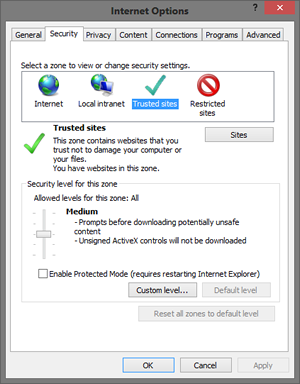
Internet Explorer has quite a complex security model compared to other browsers. One unique feature is the infamous Security Zone. Zones apply different policies to code based on the URL. By default, you have the following zones: Internet, Local Intranet, Trusted Sites, Restricted Sites, and My Computer.
Each of these zones has a slightly different configuration depending on the intended usage. For example, the Internet zone is designed to handle untrusted code from the internet. The settings are locked down tightly, and recent versions of IE run this code in a sandbox with Protected Mode.
Compare this to the Intranet zone which has a more relaxed configuration. If a URL is included in this zone it is considered to be trusted to a greater degree than one in the Internet zone. IE will even respond differently to authentication requests for sites in the Intranet zone to support Windows Authentication (see IWA, NTLM, Kerberos, and SPEGNO.)
Everything is fine and dandy when your application has code that only loads from URLs belonging to a single zone. However, things will start to go pear-shaped when you have code loading from different zones. The exact behaviour will depend on your application, but you'll often see inconsistent behaviour between environments. The explanation for this is often the application of group policy resulting in different connfigurations across machines.
So how do you go about debugging these issues? My approach is to start with the following:
Make sure the problem only happens in IE. Doing this will save you a lot of pain as debugging with the Chrome developer tools is often a more pleasant experience than using the IE tools.
Identify all of the domains hosting your code. Understand what zones contain your host page, and which ones contain other scripts or code that you are pulling in.
Temporarily move all of the code into a single zone. If you move all of your code into a single zone for testing you can confirm whether Protected Mode issues are at the heart of your problem. You may need to tweak some IE zone settings to get the features you need, but it's a good start.
Disable compatibility view. Sites in the Intranet zone use this feature by default, and it can cause problems. Temporarily turn it completely off for the Intranet Zone so that that things are consistent across zones.
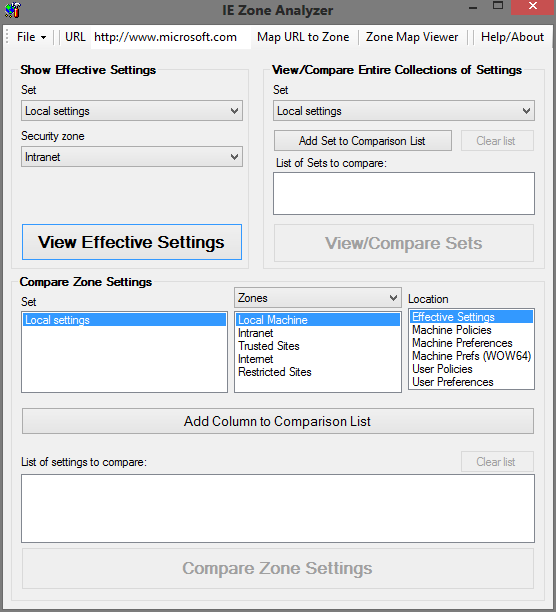
Use IE Zone Analyzer. This tool allows you to review the configuration of zones in great detail, and help with bugs that only appear in certain environments. It is available for free from Microsoft.
At this point you'll be in a better position to debug specific code in IE, but how do you remediate the problem? Well you have to make a change somewhere. It is common for admins to add wildcards like *.domain.com to the Intranet zone. Naturally this will not discriminate between Intranet sites, and cause a lot of problems if you have modern code that doesn't run well under Compatibility View. Try to educate your admins on the appropriate configuration so that your environment will be more secure, and you'll also spend less time debugging!
I work with a lot of virtual machine images and other big data sets that needed to be archived, or moved around. If I run a command like tar -cjf archive.tar.bz2 directory it will churn away on a single core.
Given that all my machines have a lot of cores, it would be better if the tar command made use of all available cores. Thankfully someone created a tool called pigz (pronounced "pig-zee") that will allow the use of these CPU cores.
There are 2 parts to the setup for pigz: get the utility, and force tar to use it. On my Mac I grabbed pigz from brew:
brew install pigz
Then I added an alias so that tar uses this by default:
alias tar='tar --use-compress-program=pigz'
Remember that you might not want to use an alias if your profile travels with you to environments where the use of all cores could create problems.
 Expat Coder